
Free Background Remover Online (2026 Updated) – Remove Image Background Instantly
Use our Free Background Remover Online to remove image backgrounds instantly in seconds. Upload PNG, JPG, or WebP files and download clean transparent images fast. Updated 2026.
Background Remover
Remove background instantly (Free • No Signup)
Drag & drop your image here
or browse files
PNG, JPG, WebP • Max 10MBRemove image backgrounds quickly with our Free Background Remover Online tool. Upload your PNG, JPG, or WebP image, let the AI-powered tool erase the background automatically, and download a clean transparent result in seconds. No signup, no watermark, and beginner-friendly. Updated for 2026.
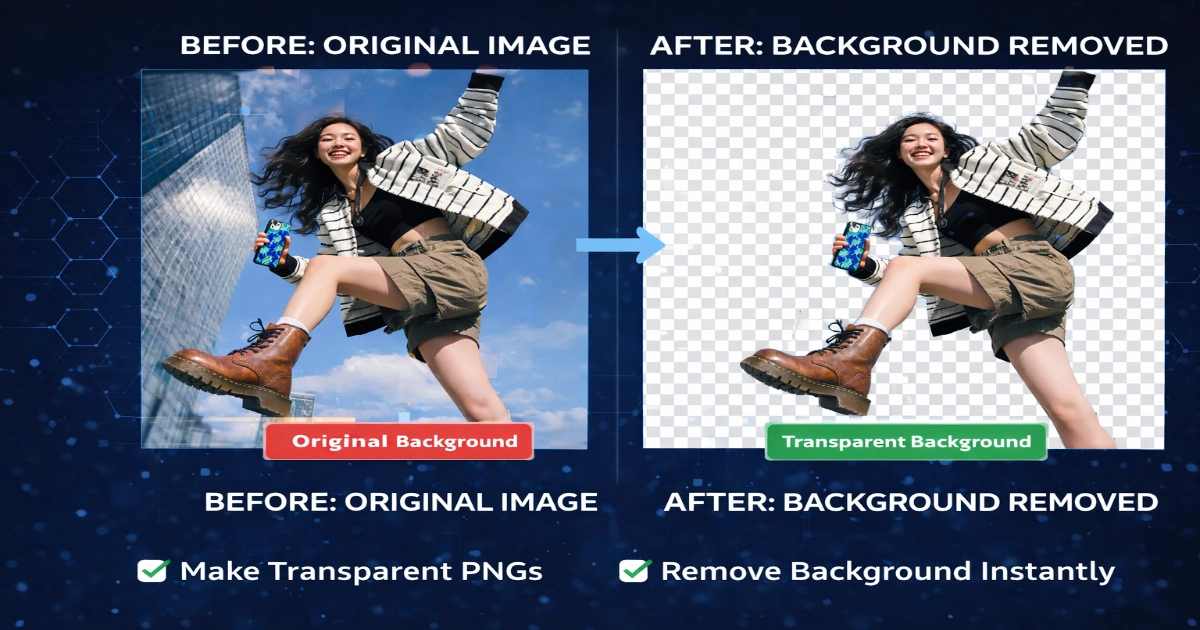
How to Use Background Remover
Using the Background Remover is quick and beginner-friendly. You can remove unwanted image backgrounds in just a few simple steps.
Simple Steps
-
Upload your image in PNG, JPG, or WebP format.
-
Click the Remove Background button.
-
Let the tool process the image automatically.
-
Download your final file in HD PNG, JPG, or WebP format.
The process is designed to save time and make background editing easier without complex software.
Benefits of Using Background Remover
The Background Remover can help users create cleaner, more professional visuals for websites, ecommerce, and social media.
Key Benefits
-
Remove backgrounds instantly in one click
-
Create transparent PNG images easily
-
Supports JPG, PNG, and WebP files
-
No signup required
-
Completely free to use
-
Fast browser-based workflow
-
Useful for beginners and professionals alike
Where You Can Use Background Remover
The Background Remover is useful for many personal and business image editing needs.
Popular Use Cases
-
Ecommerce product images
-
YouTube thumbnails
-
Social media posts and ads
-
Graphic design projects
-
Logos and promotional graphics
-
Personal profile photos
-
Professional business images
-
Presentation visuals
Background Remover Online Free – PNG, JPG, WebP • Max File Size: 10MB Supported
Remove image backgrounds instantly with our free online Background Remover. Upload PNG, JPG, or WebP files, erase the background in one click, and download the finished image in HD PNG, JPG, or WebP format.
No signup required. Fast, simple, and designed for everyday users, creators, and businesses.
Background Remover Online Free – Fast, Simple, and No Signup Required
Removing the background from an image should be quick, clean, and easy. Our free Background Remover helps users remove unwanted backgrounds from PNG, JPG, and WebP images in just a few clicks.
Whether you want to create a transparent PNG, improve product photos, prepare social media graphics, or make images ready for design projects, this tool offers a simple browser-based solution without complicated steps.
Many users need a fast way to turn a normal image into a clean transparent background image without downloading heavy software. Instead of using advanced editing programs, you can upload your file, remove the background, and download the final result in seconds.
The tool is designed for creators, businesses, ecommerce sellers, students, and anyone who needs cleaner images quickly.
Supported File Types and Downloads
The Background Remover supports widely used image formats so users can work with common files easily.
Supported Upload Formats
-
PNG
-
JPG
-
WebP
Download Options
After processing, you can download the final image in high quality based on your preferred format.
Which Format Should You Choose?
-
PNG – Usually the best option for transparent backgrounds and design flexibility
-
JPG – Useful for smaller files and standard image sharing
-
WebP – Helpful for websites that need lighter files and faster loading speeds
Choosing the right format depends on how you plan to use the final image.
After removing the background, you can easily switch file types with our Image Converter Tool if needed.
Why Use This Background Remover
There are many practical reasons users look for a free online Background Remover. Some need cleaner product images for ecommerce stores, while others want transparent logos, polished social media graphics, thumbnails, profile photos, or marketing visuals.
A background remover can save time and simplify editing for creators, bloggers, small businesses, designers, students, and everyday users who need professional-looking images without complex software.
This Tool Is Useful Because It Offers:
-
fast background removal
-
no signup required
-
support for PNG, JPG, and WebP files
-
HD downloads
-
simple drag-and-drop upload
-
clean and user-friendly interface
-
beginner-friendly workflow
The goal is to make image cleanup faster and easier for anyone.
Best Uses for a Background Remover
A Background Remover can be useful in many personal, creative, and business situations.
Common Use Cases Include:
-
product photo editing
-
transparent logo creation
-
profile image cleanup
-
social media graphics
-
posters and promotional visuals
-
YouTube thumbnails
-
portfolio images
-
online store listings
-
presentation graphics
If you run an ecommerce store, removing the background from product photos can make listings look cleaner and more professional.
If you create YouTube thumbnails or social media posts, a transparent cutout can make it easier to place subjects on custom backgrounds.
For cleaner final results, you can adjust image dimensions first with our Image Resizer Tool before using the Background Remover.
PNG, JPG, and WebP Background Removal
One of the most useful features of the Background Remover is support for multiple image formats. This gives users more flexibility when editing photos, graphics, logos, and website visuals.
PNG Background Remover
PNG is often the best choice when transparency is important. If you need a transparent image for logos, design projects, overlays, presentations, or marketing graphics, PNG is usually the preferred format.
JPG Background Remover
JPG is one of the most common image formats for everyday photos. If you upload a JPG file, you can remove the background and later download the result in a format that better suits your project.
WebP Background Remover
WebP is useful for modern websites because it often offers smaller file sizes while maintaining good quality. If you want a lightweight image for web use, WebP can be a smart option.
Choosing the right output format depends on whether you need transparency, smaller size, or standard compatibility.
How to Use the Tool
The Background Remover is designed to be simple and beginner-friendly.
Easy Steps
-
Upload your PNG, JPG, or WebP image.
-
Click the Remove Background button.
-
Wait a moment while the tool processes the image.
-
Preview the cleaned result.
-
Download the final output in PNG, JPG, or WebP.
The workflow is straightforward, allowing even first-time users to remove backgrounds quickly without confusion or advanced editing skills.
Transparent PNG Maker for Fast Editing
A common reason users search for a background remover is to create a transparent PNG. Transparent PNG images are useful in design, branding, overlays, presentations, websites, and social media graphics.
Instead of manually cutting out the subject in editing software, this tool helps speed up the process. Once the background is removed, you can save the file as PNG and use it anywhere transparency is needed.
After editing, you can compress image online to reduce file size and improve loading speed.
Free Online Background Remover for Everyday Use
This tool is built for users who want a quick and free solution. Many online tools ask for account creation or lock features behind subscriptions. Here, the focus is simplicity. Upload your image, remove the background, and download the result.
This makes it useful for:
- bloggers
- ecommerce sellers
- marketers
- students
- designers
- content creators
- social media users
Future Features Coming Soon
More editing features may be added in future versions of the tool, including:
- Edit Cutout
- Resize
- Add Background
These features can help users do more than just remove a background. They will make the page even stronger as a complete image editing tool in the future.
Final Thoughts
If you need a fast, simple, and free background remover online, this tool gives you a practical solution. It supports PNG, JPG, and WebP files, works without signup, and allows HD downloads after background removal. Whether you want transparent PNG images, cleaner product photos, or better content assets, this background remover helps you do the job quickly.
To access more tools for editing, converting, and optimizing images, you can explore all image tools available on PixelCraftTools.
Frequently Asked Questions (FAQs)
What is a background remover?
A background remover is a tool that removes the background from an image and keeps the main subject visible.
Is this background remover free?
Yes, this tool is free to use.
Do I need to sign up?
No, you can use the tool without signup.
Which file formats are supported?
This tool supports PNG, JPG, and WebP uploads.
Which format is best for transparent backgrounds?
PNG is usually the best format when you need transparency.
Can I remove the background from JPG images?
Yes, JPG images are supported.
Can I remove the background from WebP images?
Yes, WebP images are also supported.
Is there a file size limit?
Yes, the current limit is 10MB.
Can I download the final image in HD?
Yes, HD download options are available.
Are more editing features coming?
Yes, Edit Cutout, Resize, and Add Background can be added as future features.
Usage Policy
PixelCraftTools Background Remover is developed to provide fast and simple image background removal for general use. The tool is intended for everyday tasks such as content creation, design preparation, and basic image editing.
While we aim to provide accurate and clean results, users should review outputs before using them in professional or commercial environments.
Important Notice
This tool performs automatic background removal using browser-based processing. Due to differences in image quality, lighting, and subject complexity:
- Results may vary from image to image
- Fine edges (hair, shadows, transparent objects) may not always be perfect
- Manual editing may be required for advanced precision
Privacy & File Handling
Your data stays private.
- Images are processed directly in your browser
- No images are uploaded to external servers
- No files are stored, tracked, or shared
- Everything is cleared once you refresh or leave the page
User Responsibility
By using this tool, you confirm that:
- You own the image or have permission to use it
- You are not uploading restricted, illegal, or sensitive content
- You understand how the processed image will be used
PixelCraftTools does not take responsibility for user-uploaded content.
Output & Quality Disclaimer
This tool is optimized for speed and ease of use, not advanced editing.
- Output quality depends on the original image
- Transparent results may vary based on background complexity
- Format conversions (PNG, JPG, WebP) may slightly affect quality
- Always review the final file before publishing or printing
Compatibility Notice
For best performance:
- Use updated browsers (Chrome, Edge, Safari)
- Avoid outdated devices or unsupported browsers
- Performance may vary depending on system speed
No Guarantee
All services are provided “as available”.
We do not guarantee:
- 100% perfect background removal in all cases
- Continuous or uninterrupted service
- Identical results for every image
Intended Use
This tool is designed for:
- quick background removal
- transparent PNG creation
- basic image editing workflows
It is not a replacement for professional tools like Photoshop for advanced editing tasks.
Fair Usage Guidelines
To keep the tool fast and stable:
- Avoid uploading extremely large or corrupted files
- Do not use automated scripts or bots
- Use the tool responsibly for normal usage
Copyright & Content Rights
Users must ensure that they either own the uploaded image or have permission from the original copyright holder before using this tool. PixelCraftTools is not responsible for copyright violations, unauthorized uploads, or misuse of third-party content. Google also provides general guidance on copyright and original content usage through its official legal and search documentation. See Google Search Essentials and Google Copyright Help for reference.
External Policy Reference
For broader guidance on content quality, originality, and responsible publishing practices, users can review Google’s official documentation, including Creating Helpful, Reliable, People-First Content and Spam Policies for Google Web Search. These resources explain how Google evaluates content quality and policy compliance. See Google Search Essentials.